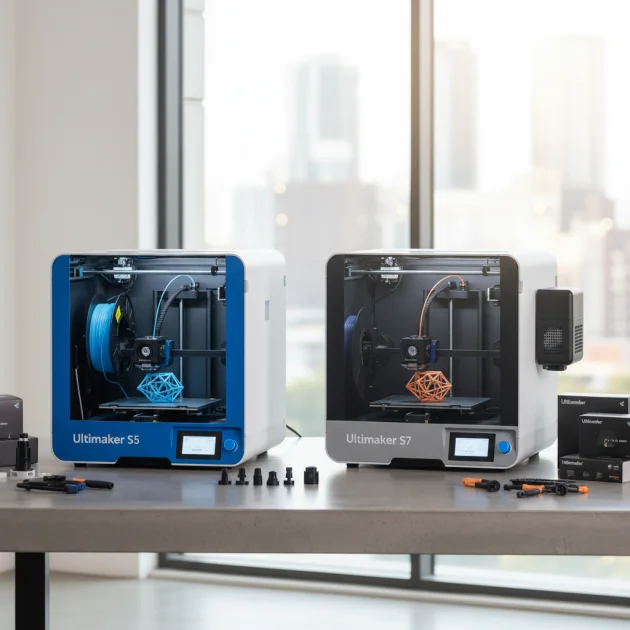
The Ultimaker S5 is the best Ultimaker 3D printer for professionals, offering a robust combination of reliability, material compatibility, and advanced features essential for demanding industrial and design applications. It provides a large build volume of 330 x 240 x 300 mm, dual extrusion, and an open filament system, making it versatile for diverse professional workflows including rapid prototyping, tooling, and end-use part production.
Quick Comparison: Ultimaker Professional 3D Printers
| Feature | Ultimaker S5 | Ultimaker S7 | Ultimaker S3 |
|---|---|---|---|
| Build Volume (mm) | 330 x 240 x 300 | 330 x 240 x 300 | 230 x 190 x 200 |
| Print Technology | FFF | FFF | FFF |
| Dual Extrusion | Yes | Yes | Yes |
| Filament Compatibility | Open System | Open System | Open System |
| Connectivity | Wi-Fi, Ethernet, USB | Wi-Fi, Ethernet, USB | Wi-Fi, Ethernet, USB |
| Price Range | High | High | Mid-High |
What Professionals Need from a 3D Printer
Professionals require 3D printers that deliver consistent, high-quality results with minimal downtime. Key considerations include reliability, precision, and a wide range of material compatibility. A professional-grade 3D printer must handle complex geometries and produce parts with tight tolerances, crucial for prototyping, tooling, and end-use parts. The ability to print with engineering-grade materials like ABS, Nylon, and composites is essential for functional applications. Furthermore, ease of use, robust software integration, and reliable technical support are paramount for maintaining efficient workflows. Professionals often operate in fast-paced environments, so a printer that offers quick setup, intuitive operation, and remote monitoring capabilities significantly enhances productivity. Safety features and a stable printing environment are also critical for consistent output and operator well-being. Ultimaker printers are designed to meet these stringent professional demands.
Detailed Reviews of Ultimaker Professional Models
Ultimaker S5
The Ultimaker S5 stands out as a top choice for professionals due to its large build volume, dual extrusion capabilities, and broad material compatibility. Its active leveling system ensures consistent first layers, reducing print failures and improving overall reliability. The S5 supports a wide array of engineering-grade filaments, including PLA, ABS, Nylon, and various composites, making it versatile for diverse applications. Its integrated software ecosystem, Ultimaker Cura, provides seamless slicing and print management. The S5’s robust construction and enclosed print chamber contribute to stable printing conditions, crucial for achieving high-quality results with demanding materials. Professionals value the S5 for its consistent performance and ability to produce accurate, functional prototypes and end-use parts.
Ultimaker S7
The Ultimaker S7 builds upon the S5’s strengths, offering enhanced features for even greater professional utility. It maintains the same generous build volume and dual extrusion system but introduces an integrated air manager and a flexible build plate. The air manager filters ultrafine particles, creating a safer working environment and improving print quality by maintaining consistent chamber temperatures. The flexible build plate simplifies part removal, saving time and reducing potential damage to prints. The S7 also features an improved inductive sensor for more precise bed leveling. These enhancements make the Ultimaker S7 an excellent choice for professionals seeking advanced environmental control, easier post-processing, and even greater reliability for critical applications.
Ultimaker S3
The Ultimaker S3 offers a more compact yet powerful solution for professionals with smaller space requirements or specific project needs. Despite its smaller build volume compared to the S5 and S7, the S3 retains dual extrusion capabilities and compatibility with a wide range of Ultimaker and third-party materials. It features the same reliable active leveling and robust build quality found in its larger counterparts. The S3 is ideal for professionals who need high-quality prints for smaller components, functional prototypes, or educational settings where space is a premium. Its affordability relative to the S5 and S7 makes it an accessible entry point for professionals seeking Ultimaker’s renowned reliability and print quality without the need for a larger build area.
Use Cases for Ultimaker 3D Printers
Ultimaker 3D printers are widely adopted across various professional sectors. In product design and engineering, they are indispensable for rapid prototyping, allowing designers to quickly iterate on concepts and test functional components. Manufacturing companies utilize Ultimaker printers for creating custom jigs, fixtures, and tooling, optimizing production lines and reducing lead times. Architectural firms leverage them to produce detailed scale models for client presentations and design validation. Educational institutions integrate Ultimaker printers into STEM programs, providing students with hands-on experience in additive manufacturing. Medical professionals use them for anatomical models for surgical planning and custom medical devices. The versatility of Ultimaker machines makes them suitable for any professional environment requiring precise, reliable 3D printing.
FAQs
What makes Ultimaker printers suitable for professionals?
Ultimaker printers are suitable for professionals due to their high reliability, precision, and extensive material compatibility. They offer consistent print quality, robust construction, and user-friendly software. Features like dual extrusion, active bed leveling, and an open filament system allow professionals to tackle diverse projects with complex requirements. The Ultimaker ecosystem, including Cura software and a wide network of support, further enhances their professional appeal, ensuring smooth operation and effective problem-solving for demanding applications.
Can Ultimaker printers handle engineering-grade materials?
Yes, Ultimaker printers are designed to handle a wide range of engineering-grade materials. They support filaments such as ABS, Nylon, Polycarbonate, and various composites like carbon fiber-filled materials. The enclosed build chambers on models like the S5 and S7 help maintain stable temperatures, crucial for printing with these advanced materials, reducing warping and improving layer adhesion. This broad material compatibility allows professionals to produce functional parts with specific mechanical and thermal properties.
What is the difference between the Ultimaker S5 and S7?
The Ultimaker S7 builds upon the S5 with several key enhancements. While both share the same build volume and dual extrusion, the S7 includes an integrated air manager for improved air quality and temperature control, and a flexible build plate for easier part removal. The S7 also features an improved inductive sensor for more precise bed leveling. These upgrades make the S7 a more refined option for professionals seeking enhanced environmental control, user convenience, and slightly improved print consistency.
Is Ultimaker Cura software easy for professionals to use?
Ultimaker Cura is widely regarded as one of the most user-friendly and powerful slicing software solutions available. It offers both basic and advanced settings, catering to users of all skill levels. Professionals appreciate its intuitive interface, extensive customization options, and seamless integration with Ultimaker printers. Cura’s profile system for various materials and printers simplifies the setup process, allowing professionals to quickly prepare complex models for printing with optimal settings, saving valuable time and reducing errors.
What kind of support can professionals expect from Ultimaker?
Professionals can expect comprehensive support from Ultimaker. This includes access to a vast online knowledge base, detailed user manuals, and a responsive customer support team. Ultimaker also has a global network of certified resellers and service partners who provide local support, training, and maintenance. The active Ultimaker community forums offer peer-to-peer assistance and a wealth of shared knowledge. This robust support infrastructure ensures professionals can quickly resolve issues and maximize their printer’s uptime.
Which Ultimaker model is best for small professional spaces?
The Ultimaker S3 is the best model for professionals with smaller space requirements. Despite its compact size, it offers dual extrusion, active leveling, and compatibility with a wide range of materials, similar to its larger counterparts. Its build volume of 230 x 190 x 200 mm is suitable for high-quality prints of smaller components and functional prototypes, making it an accessible and efficient choice for limited workspaces.
Verdict
For professionals seeking the best Ultimaker 3D printer, the Ultimaker S5 and S7 stand out as premier choices. The Ultimaker S5 offers an excellent balance of build volume, material versatility, and reliability, making it suitable for a broad spectrum of professional applications. The Ultimaker S7, with its enhanced air management and flexible build plate, provides an even more refined experience for those requiring superior environmental control and ease of use. Both models deliver the precision and consistency essential for demanding professional workflows, ensuring high-quality results for prototyping, tooling, and functional part production. The choice between them depends on specific budget and feature priorities.
Frequently Asked Questions
What makes Ultimaker printers suitable for professionals?
Ultimaker printers are suitable for professionals due to their high reliability, precision, and extensive material compatibility. They offer consistent print quality, robust construction, and user-friendly software. Features like dual extrusion, active bed leveling, and an open filament system allow professionals to tackle diverse projects with complex requirements.
Can Ultimaker printers handle engineering-grade materials?
Yes, Ultimaker printers are designed to handle a wide range of engineering-grade materials. They support filaments such as ABS, Nylon, Polycarbonate, and various composites like carbon fiber-filled materials. The enclosed build chambers on models like the S5 and S7 help maintain stable temperatures, crucial for printing with these advanced materials.
What is the difference between the Ultimaker S5 and S7?
The Ultimaker S7 builds upon the S5 with several key enhancements. While both share the same build volume and dual extrusion, the S7 includes an integrated air manager for improved air quality and temperature control, and a flexible build plate for easier part removal. The S7 also features an improved inductive sensor for more precise bed leveling.
Is Ultimaker Cura software easy for professionals to use?
Ultimaker Cura is widely regarded as one of the most user-friendly and powerful slicing software solutions available. It offers both basic and advanced settings, catering to users of all skill levels. Professionals appreciate its intuitive interface, extensive customization options, and seamless integration with Ultimaker printers.
What kind of support can professionals expect from Ultimaker?
Professionals can expect comprehensive support from Ultimaker. This includes access to a vast online knowledge base, detailed user manuals, and a responsive customer support team. Ultimaker also has a global network of certified resellers and service partners who provide local support, training, and maintenance.
Which Ultimaker model is best for small professional spaces?
The Ultimaker S3 is the best model for professionals with smaller space requirements. Despite its compact size, it offers dual extrusion, active leveling, and compatibility with a wide range of materials, similar to its larger counterparts. Its build volume of 230 x 190 x 200 mm is suitable for high-quality prints of smaller components.
Get our weekly buyer guide
Practical specs, not advice. Unsubscribe anytime.
Our design firm relies heavily on the Ultimaker S5, and it has never let us down. The open filament system is a huge plus, giving us the flexibility to use various brands and types of materials without being locked in. It’s incredibly reliable for demanding industrial applications, and the prints come out perfect every time. A truly professional-grade machine.
I picked up an Ultimaker S3 a few months ago, and while it’s a solid printer for the mid-high price range, I sometimes wish I’d sprung for the S5. The build volume of 230 x 190 x 200 mm is a bit limiting for some of my larger tooling projects. It’s great for smaller parts, but I’m already feeling the constraints. Still, print quality is good.
The Ultimaker S7 is a fantastic machine, especially with its large build volume of 330 x 240 x 300 mm. I’ve been able to print some really substantial parts for end-use production. My only minor gripe is that the initial setup took a bit longer than I expected, but once it’s dialed in, it’s incredibly reliable. The print quality is consistently excellent.
I’ve been using the Ultimaker S5 for about a year now for rapid prototyping, and it’s been an absolute workhorse. The dual extrusion is a game-changer for complex designs, allowing me to use support materials seamlessly. It handles a wide range of filaments without a hitch, which is crucial for my varied projects. Definitely worth the investment for any professional setup.